Wednesday, May 7, 2014

Build System Performance on Windows

Over the last three months I had the pleasure to run Fedora 20 Linux on the Laptop I am using for work. Last week, I was forced to downgrade to Windows 7. (Mainly, because my employers system administrators don't support everything else. I am quite ready to have the occasional fight for my freedom against the admins, but I won't accept the constant struggle. To name just the most important problem: Accessing an MS Exchange Server without IMAP enabled is, at best, exhausting.) Why the word "downgrade"? Because my machine is so much slower now. I am a developer. My Eclipse is open for 10 hours a day and I can't count the number of invocations of Ant, Maven, Make, and other build systems. (Ant, and Maven, being my personal favourites.) Of course, the machine isn't actually slower. It is the same hardware, after all. Same amount of RAM, still without an SSD. However, and that's a fact: Running one and the same build system against the same project on Windows 7 takes more time than doing just that on Linux. If you don't believe me, try the following: Install a Linux VM on your Windows PC. Then run the following command, first on the VM, then on the Windows host:
git checkout https://github.com/torvalds/linux.git
What are the odds, that this command will run faster on the Linux VM than on the Windows hosts. I'd bet. And I'd win. (It's true: Linux Git on the emulated hardware wins against Windows Git on the raw iron.) Btw, for an even more convincing example, try "git svn checkout".) This week, I decided to waste some time to think about the issue: How do I get my build system on Windows as fast as on Linux. First, let's identify the guilty party: It's none other than... (drum roll) NTFS! I'm not making this up: Others are quite aware of the problem. See, for example, this page. A Google search for "ntfs performance many small files" returns about 168000 hits. So, let's state this as a fact: NTFS behaves extremely poor when dealing with lots of small files. But that's exactly, what a build system is all about. Let's take a typical example:
  1. The first typical step is to remove a build directory (like "target", or "bin", or whatever you name it.)
  2. The compiler reads a lot of small source files (named *.java, *.c, or whatever) from the "src" directory.
  3. For any such file, the compiler creates a corresponding, translated file (named *.class, or *.o, or whatever) in the build directory.
  4. A packager, or linker, like "jar", or "ln" combines all these files we have just created into a single target file.
Notice something? This is the same for all build systems. It really doesn't matter, whether your build script uses XML, a DSL, JSON, or a binary format. (No, this is holy war won't have my participation.) What matters is this: All current build systems are based on the mantra of an output directory, where lots of small files are created. But, that's not a necessity. So, here's the challenge: Let's modify our build systems in a manner that replaces the output directory with a "virtual file system". If we do it right, we can be much, much faster. As a poof of concept, I wrote a small Java program, that extracts the Linux Kernel sources (aka the file "linux-3.14.2.tar.gz") and writes them into implemantations of the following interface:
public interface IVFS {

	OutputStream createFile(String pPath) throws IOException;

	void close() throws IOException;
}
For any source file (45941 files) the method createFile is invoked, the file is copied intoo the OutputStream, and the stream is closed. Finally, the method IVFS.close() is invoked. Here's my programs output:
   Linux Kernel Extraction, NullVFS: 4159
   Linux Kernel Extraction, SimpleVFS: 1740044
   Linux Kernel Extraction, MapVFS: 78134
The three implementations are:
  1. The NullVFS inherits the idea of /dev/null: It is basically a write-only target. Of course, this isn't really useful. On the other hand, it shows how fast we could be, in theory, if our target were arbitrarily fast: In this case 4159 milliseconds. (This is, mainly, the time for reading the Linux Kernel sources.)
  2. The SimpleVFS is basically, what we have now. Files are actually created. As expected, this is really slow, and it takes more than 1740 seconds.
  3. Finally, the MapVFS is basically an In-Memory store. However, it might be really useful, because its close method is creating a big file with the actual contents on disk. With 78 seconds, this implementation is still close to the NullVFS. It demonstrates what might be really possible.
Conclusion: When creating one file with our actual contents, we need 78 seconds, as opposed to 1740 seconds. Of course, the IVFS interface is an oversimplification. The implementations certainly aren't thread safe. We have omitted the possibility to modify files that have previousöy been created. But the numbers are so impressive that I am personally convinced: If we a) modify our build system to use a virtual file system as the output and b) provide fast implementations, then we have much to gain, fellow developers! In practice, this won't be so easy. The biggest hurdle I am anticipating, is the Java Compiler. Even the Java Compiler API (aka the interface javax.tools.JavaCompiler) is based on real files: We won't be able to use the Java Compiler, as it is now. Instead, we have to manipulate them to use the VFS. ECJ, the Eclipse Java Compiler might be our best option for that. Who'll take the first step? Well, Gradlers, Buildrs, SConsers, of the world: Here's something where your users could have a real difference!

Thursday, May 1, 2014

The sins of our fathers

"Fathers shall not be put to death for their sons, nor shall sons be put to death for their fathers; everyone shall be put to death for his own sin." (Deuteronomy 24:16) But, of course, we are paying for our fathers sins. Not so much our biological fathers or ancestors, but our predecessors. In my case, this is what's happened today: I wrote a very small Java program that extracts the Linux Kernel sources (More on the reasons and background, hopefully, in my next posting. Suffice it for now, that I'm not rewriting "tar xzf". I'm not that stupid! I had a good reasons. Now, the Kernel Sources are containing in particular, a small file named "aux.c". And my own program threw a FileNotFoundException when creating that file. Reproducible! The error message was, of course, meaningless, so I began to start thining about all kinds of reasons:
  1. Permissions, either those of the file itself, or the containing directory. Mo, the permissions were just fine!
  2. Length of the path name. Actually, the full path name contained quite some characters, but still far away from the 256 that I am aware of.
  3. Too many open files. No, I have had my share of beginners faults and was properly closing.
Any other ideas. I guess you don't get this one: Some JDK programmer was actually implementing a check for aux.*, nul.*, prt.* etc when creating a file, because these file names where in fact a problem with Windows in the past. Of course, the sensible solution would have been:
  1. Wait for the error message from Windows.
  2. Check the file name.
  3. Throw a meaningful error message that explains the problem.
That way, veything would have worked fine, if the unthinkable happened: Windows eliminates that stsupid restriction. Because that was exactly what happened. There is now problem with creating that file. Convince yourself:
  $ touch aux.c

  jwi@MCJWI01 /c/Users/jwi/workspace/afw-vfs
  $ ls -al aux.c
  -rw-r--r--+ 1 jwi Domain Users 0 May  1 16:02 aux.c

  jwi@MCJWI01 /c/Users/jwi/workspace/afw-vfs
So, our JDK programmer has managed to move the problem with the "aux.c" file name from Windows to the JDK. Thanks, a lot!

Tuesday, September 10, 2013

Installing Obsolete Java JDK versions on Fedora Linux

As a Java developer, one is frequently forced to use obsolete, or even deprecated, Java versions. So I came to the necessity to install Java 6 on Fedota 19. The problem: In the Fedora 19 repositories, there's only Java 7 and 8. Convince yourself:

$ sudo yum list | grep openjdk
java-1.6.0-openjdk.x86_64              1:1.6.0.0-59.1.10.3.fc16         installed
java-1.6.0-openjdk-devel.x86_64        1:1.6.0.0-59.1.10.3.fc16         installed
java-1.6.0-openjdk-javadoc.x86_64      1:1.6.0.0-59.1.10.3.fc16         installed
java-1.7.0-openjdk.x86_64              1:1.7.0.60-2.4.2.0.fc19          @updates
java-1.7.0-openjdk-demo.x86_64         1:1.7.0.60-2.4.2.0.fc19          @updates
java-1.7.0-openjdk-devel.x86_64        1:1.7.0.60-2.4.2.0.fc19          @updates
java-1.7.0-openjdk-javadoc.noarch      1:1.7.0.60-2.4.2.0.fc19          @updates
java-1.7.0-openjdk-src.x86_64          1:1.7.0.60-2.4.2.0.fc19          @updates
java-1.7.0-openjdk-accessibility.x86_64
java-1.8.0-openjdk.i686                1:1.8.0.0-0.9.b89.fc19           updates 
java-1.8.0-openjdk.x86_64              1:1.8.0.0-0.9.b89.fc19           updates 
java-1.8.0-openjdk-demo.x86_64         1:1.8.0.0-0.9.b89.fc19           updates 
java-1.8.0-openjdk-devel.i686          1:1.8.0.0-0.9.b89.fc19           updates 
java-1.8.0-openjdk-devel.x86_64        1:1.8.0.0-0.9.b89.fc19           updates 
java-1.8.0-openjdk-javadoc.noarch      1:1.8.0.0-0.9.b89.fc19           updates 
java-1.8.0-openjdk-src.x86_64          1:1.8.0.0-0.9.b89.fc19           updates 
The same goes for Fedora 18 and 17, btw. (I'll skip the output here. Note, that processing these commands will take some time, as yum will download the complete repository metadata for the respective version.
$ sudo yum --releasever=17 list | grep openjdk
$ sudo yum --releasever=18 list | grep openjdk
However, Java 6 is available for Fedora 16!
$ export http_proxy=MY_PROXY_URL, for example http://my.proxy.server:8080
$ wget wget http://archives.fedoraproject.org/pub/archive/fedora/linux/releases/16/Fedora/x86_64/os/Packages/java-1.6.0-openjdk-1.6.0.0-59.1.10.3.fc16.x86_64.rpm
$ wget http://archives.fedoraproject.org/pub/archive/fedora/linux/releases/16/Fedora/x86_64/os/Packages/java-1.6.0-openjdk-devel-1.6.0.0-59.1.10.3.fc16.x86_64.rpm
$ wget http://archives.fedoraproject.org/pub/archive/fedora/linux/releases/16/Fedora/x86_64/os/Packages/java-1.6.0-openjdk-javadoc-1.6.0.0-59.1.10.3.fc16.x86_64.rpm
Now, my first (and preferred) attempt to install these would be
$ sudo yum localinstall --obsoletes java-1.6.0-openjdk*
which fails, due to the following error message:
  error: Failed dependencies:
  java-1.6.0-openjdk is obsoleted by (installed) java-1.7.0-openjdk-1:1.7.0.60-2.4.2.0.fc19.x86_64
  java-1.6.0-openjdk-devel is obsoleted by (installed) java-1.7.0-openjdk-1:1.7.0.60-2.4.2.0.fc19.x86_64
  java-1.6.0-openjdk-javadoc is obsoleted by (installed) java-1.7.0-openjdk-1:1.7.0.60-2.4.2.0.fc19.x86_64
(Please contact me, if you have an idea on how to get rid of these!) Fortunately, there's another possibility, which does the job quite neatly:
$ sudo rpm --nodeps -i java-1.6.0-openjdk*
If you're an Eclipse user, the JDK can now be found in /usr/lib/jvm/java-1.6.0-openjdk-1.6.0.0.x86_64/

Friday, May 3, 2013

Slow Startup of Cygwin Bash

When on Windows, I never use another terminal/shell than MinTTY/CygWin Bash. So I was heavily harmed by a problem that started quite some time ago: Suddenly, when I opened MinTTY, it took 10 seconds or so, before the bash prompt became visible. Today, I finally discovered the culprit by reading another post. As you posssibly know, there is a directory /etc/profile.d containing scripts that are executed when a login shell is starting. Now, one of these scripts, called bash_completion.sh is extremely slow. You can try for yourself:
$ time . /etc/profile.d/bash_completion.sh

real    0m8.908s
user    0m1.402s
sys     0m7.310s

In other words, solving the issue for me was as simple as renaming this script:
$ mv /etc/profile.d/bash_completion.sh /etc/profile.d/bash_completion.sh.disabled
Voila! My MinTTY opens immediately again. Update: The above time command is only slow when the script is being executed for the first time. In other words, if your bash was starting slow due to executing it, then you might see a result like this:
$ time . /etc/profile.d/bash_completion.sh

real    0m0.000s
user    0m0.000s
sys     0m0.000s

Friday, November 23, 2012

RfC: Improving Mavens Performance

I am typically working in projects that are relatively complex, like one parent projects and 20 modules, or so. To handle the complexity, I have learned to use and appreciate Maven. OTOH, after 8 years or so with Maven, I am still missing some aspects of Ant builds, in particular the speed. Maven does a good job when it comes to understand Build scripts (biggest problem of Ant), but it can be painfully slow. Why is that? I could name several reason, but the most obvious seems to be that Maven is always building the whole project, whereas Ant allows to implement logic like

   if (module.isUpToDate()) {
     // Build it
   } else {
     // Ignore it
Of course, Ant's syntax is completely different, but that's not the point, unless you are a fanatic XML hater and really believe that a Groovy or JSON syntax is faster by definition (If so, stop reading, you picked up the wrong posting!)
The absence of such an uptodate check isn't necessarily a problem. Most Maven plugins are nowadays implementing an uptodate check for themselves. OTOH, if every plugin does an uptodate check and the module is possibly made up of other modules itself, then it sums up.
Apart from that, uptodate checks can be unnecessarily slow. Suggest the following situation, which I have quite frequently:
A module contains an XML schema. JAXB is used to create Java classes from the schema If the schema is complex, then the module might easily have severeal thousand Java source files.
This means, that the Compiler plugin needs to check the timestamps of several thousand Java and .class files, before it can detect that it is uptodate. Likewise, the Jar Plugin will check the same thousands of .class files and compare it against the jar file, before building it.
That's sad, because we could have a very easy and quick uptodate check by comparing the time stamps of the XML schema, and the pom file (it does affect the build, does it) with that of the jar file. If we notice that the jar file is uptodate with regard to the other two, then we might ignore the module at all: Ignore it would mean to completely remove it from the reactor and not invoke the Compiler or Jar plugins at all. Okay, that would help, but how do we achieve that without breaking the complete logic of Maven? Well, here's my proposal:
  1. Introduce a new lifecycle phase into Maven, which comes before everything else. (Let's call it "init". In other words, a typical Maven lifecycle would be "init, validate, compile, test, package, integration-test, verify, install, deploy" (see this document, if you need to learn about these phases.
  2. Create a new project property called "uptodate" with a default value of false (upwards compatibility).
  3. Create a new Maven plugin called "maven-init-plugin" with a configuration like
       groupid: org.apache.maven.plugins
            artifactId: artifactid>="maven-init-plugin"
            configuration:
               sourceResources:
                 sourceResource:
                   directory: src/main/schema
                   includes:
                     include: **/*.xsd
                 sourceResource:
                   directory: .
                   includes:
                     include: pom.xml
               targetResources: ${project.build.directory}
                   includes:
                     include: *.jar
        (Excuse the crude syntax, I have no idea how to dixplay XML on blogspot.com!
         I hope, you do get the idea, though.)
        The plugins purpose would be to perform an uptodate check by comparing source-
        and target resources and set th "uptodate" flag accordingly.


  • Modify the Maven core as follows: After the "init" phase, search for modules with isUptodate() == true and remove those modules from the reactor. Then run the other lifecycle phases.
  • That's it. Perfectly upwards compatible. Moderate changes. Much faster builds. How about that?

    Friday, November 16, 2012

    DB2 Weirdness

    In the year 2012, what serious database might require code like this:
    private ResultSet getColumns(DatabaseMetaData pMetaData,
                                 String pCat,
                                 String pSchema,
                                 String pTableName)
        throws SQLException {
     if (pMetaData.getDatabaseProductName().startsWith("DB2")) {
       final String q = "SELECT null, TABSCHEMA, TABNAME, COLNAME," 
      + " CASE TYPENAME"
      + " WHEN 'BIGINT' THEN -5"
      + " WHEN 'BLOB' THEN 2004"
      + " WHEN 'CHARACTER' THEN 1"
      + " WHEN 'DATE' THEN 91"
      + " WHEN 'INTEGER' THEN 5"
      + " WHEN 'SMALLINT' THEN 4"
      + " WHEN 'TIMESTAMP' THEN 93"
      + " WHEN 'VARCHAR' THEN 12"
      + " WHEN 'XML' THEN -1"
      + " ELSE NULL"
      + " END, TYPENAME, LENGTH FROM SYSCAT.COLUMNS"
      + " WHERE TABSCHEMA=? AND TABNAME=?";
       final PreparedStatement stmt =
         pMetaData.getConnection().prepareStatement(q);
       stmt.setString(1, pSchema);
       stmt.setString(2, pTableName);
       return stmt.executeQuery();
     } else {
       return pMetaData.getColumns(pCat, pSchema, pTableName, null);
     }
    }
    
    or this:
      private ResultSet getExportedKeys(DatabaseMetaData pMetaData)
         throws SQLException {
        if (pMetaData.getDatabaseProductName().startsWith("DB2")) {
          final String q = "SELECT null, TABSCHEMA, TABNAME,"
          +  " PK_COLNAMES, null, REFTABSCHEMA, REFTABNAME,"
          +  " FK_COLNAMES, COLCOUNT FROM SYSCAT.REFERENCES"
          +  " WHERE TABSCHEMA=? OR REFTABSCHEMA=?";
          final PreparedStatement stmt =
            pMetaData.getConnection().prepareStatement(q);
          stmt.setString(1, "EKFADM");
          stmt.setString(2, "EKFADM");
          return stmt.executeQuery();   
        } else {
          return pMetaData.getExportedKeys(null, "EKFADM", null);
        }
    }


    Thursday, October 18, 2012

    BPM Process Migration

    BPM Process Migration

    Having worked in several BPM projects for quite some time, I usually enjoy the help of the BPM server. In particular, BPMN etc. are excellent for conversations with the customers. Of course, you still need to translate the customers desires into your own technical picture (which might differ considerably), but in the end you'll likely to get something that gives the customer a "I know this" feeling, which is worth a lot. Of course, there are still gaps, problems, and all that stuff. However, what really sucks, are upgrades of the project version.

    Disclaimer: I am no BPM expert, much less skilled in the theory, just an experienced user. This is just the result of my thinkings. In particular, don't mismatch this post with a statement of my employer, Software AG, or Fujitsu. It reflects my impression of how to work with the webMethods BPM Server, or the Fujitsu Interstage Server. I have no idea how these ideas can be transferred to other BPM tools like, for example, Apache ServiceMix, or whatever.

    Terminology


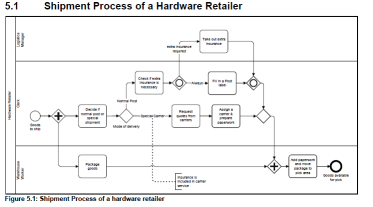
    A BPM Process Model in the sense of this posting is a set of Process Nodes and a set of transitions between these nodes. In what follows, let PM be a process model, PN be the set of PM's nodes and TPN the set of transitions. PN consists two special subsets, the start nodes (SPN), and the end nodes (EPN). A process model typically reflects some kind of workflow can be graphically visualized (see, for example, this picture:


    The possibility of graphical visualization is what's so attractive about BPM for non-technical folk.)
    A BPM Process State is an element from a universe U, typically an unstructured set of named objects. In the case of Interstage BPM, these named objects are strings, in the case of webMethods BPM these objects can be complex (maps, arrays, etc.: the webMethods Pipeline):

    A BPM Process Instance is an element of the set PN x U: A combination of a process node and a process state. This definition is too geeneral, of course. For example, the node PN must be reachable from a start node via a series of transitions out of TPN. However, for now we can ignore this.
    A BPM Process Model can have multiple versions. These versions are usually related, for example, the sets of process nodes and transitions are frequently subsets. In general, however, they can be completely unrelated.
    A BPM Process Migration involves
    1. the creation of one or more new process models, or model versions.
    2. Possibly the removal of existing process models and process instances.
    3. Possibly a migration of process instances from one, or more process models to a new process model, typically a new version of their current model.
    This last part is the one that sucks, because it is completely unsupported. The developers are completely left alone. (All you can do is to ensure some kind of compatibilty, which usually implies leaving old software versions, or at least parts thereof, in place and hoping, that old and new versions are working fine together.)

    But, how could such tools look like? This is what my post is about:
    • It should be possible to replace process models with new versions by migrating the process instances.
    • This means that a developer ought  to be able to specify a mapping from the set PN1 x U to PN2 x U. (The mapping would usually be a Java class implementing a special interface.)
    Example: A process state usually contains entries like these:
    ID (Database or any other internal ID, for example an incoming order; the process specific details are stored elsewhere and not as part of the pipeline, which would otherwise grow too big. However, the details are easily accessible.)
    State (A human readably process state, like "unconfirmed", "available", or "acknowledge".)
    Names (for example, name of the orderer, etc. These are frequently not really required, but redundant and just copied from the details for the sake of convenience.)

    A new process version might introduce a new ID (for example, from another external system, which is now connected to the processs), a new state, or something like that. In order to get the existing process instances working with the new model, we can either
    - modify the process so that it does support null values, even if they are mandatory from a business perspective
    - enhance the process state by adding these new values as part of the migration.
    Guess, which I'd prefer? And, guess which we are left with now?